Metadata, README, and Description
When you initialize a Solidipes project, you create a new directory called .solidipes in your project root, as well as Markdown files:
File |
Description |
Status |
|---|---|---|
|
Automatically generated file containing standard metadata concatenated with the project description. This file should NOT be modified directly. It is generated from |
Automatically generated |
|
Contains the description of the project or dataset. This file should describe the study in more detail, similar to an abstract. It is used as input when generating |
To be edited by user |
|
Contains structured metadata about the study, such as study name, authors, and description. This file must be manually edited with information specific to the study. It can also be accessed through the web interface. |
To be edited by user |
Modify the metadata (study_metadata.yaml)
The study_metadata.yaml contains metadata about your study. You can edit this data via the webreport or manually.
Web interface edit of metadata
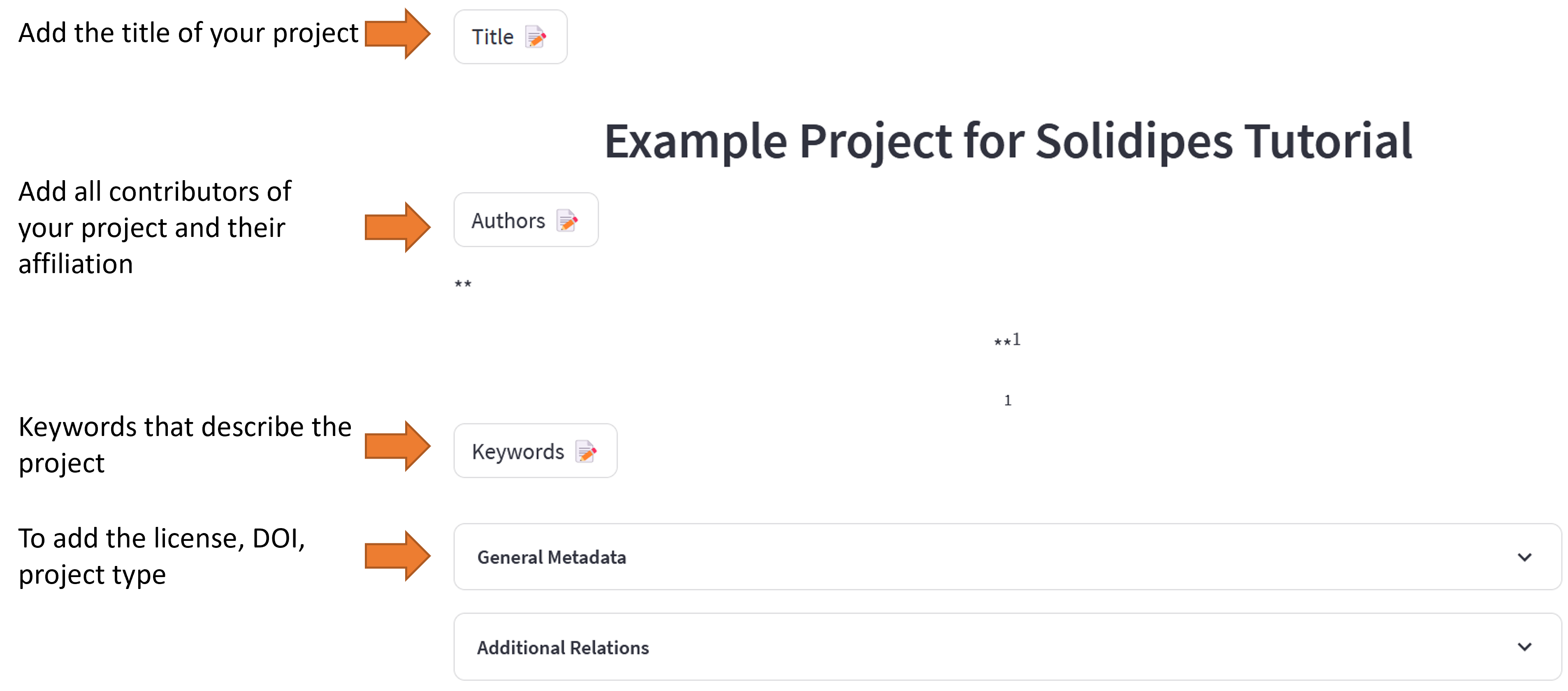
Title: The title of your project.
Creators: The contributors to the project. You can add as many as you like.
Give their name and their affiliation. The
orcidis optional.For example, if you have two creators, you can write:
- affiliation: EPFL
  name: Toto
  orcid: 0000-0003-3451-7297
- affiliation: LSMS
  name: Toto Dodo
Note
The
orcidis optional. It is a unique identifier for researchers. You can create one here: https://orcid.org/The
affiliationis optional but (highly) recommended.
Warning
An error will be raised if the indentation is not respected.
Keywords: Should describe your project. You can add as many as you like.
Adding keywords must respect the following format:
keyword1, keyword2, keyword3
description: The description of your project. This will be used to generate the
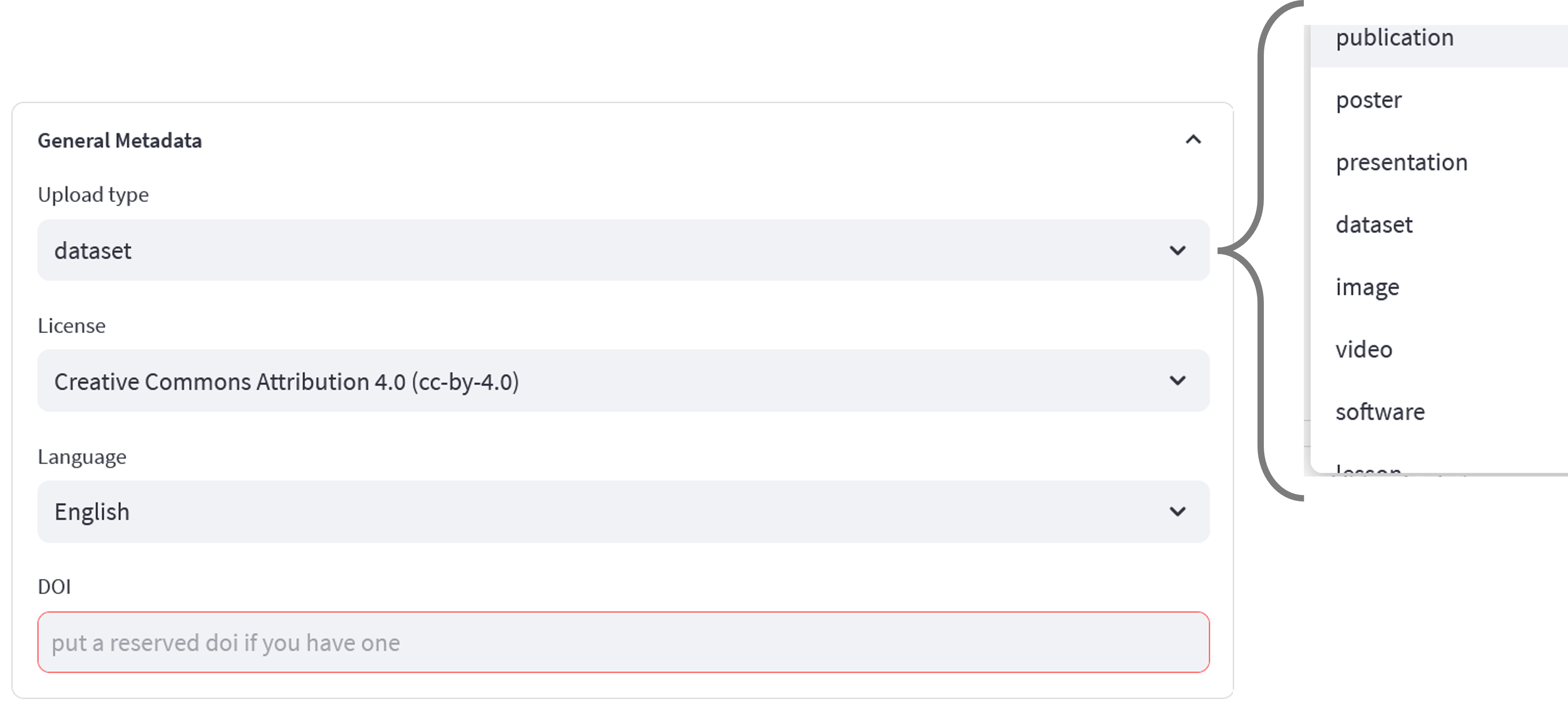
README.mdfile.upload_type: The type of upload. For example,
dataset.license: The license under which your data is published. For example,
cc-by-4.0.DOI: If you have already published your project you can add the DOI here. Else a DOI will be generated when you upload your project onto Zenodo.
additional relations: You can add additional relations to your project. For example, if you have a paper related to your project, you can add the DOI of the paper here.
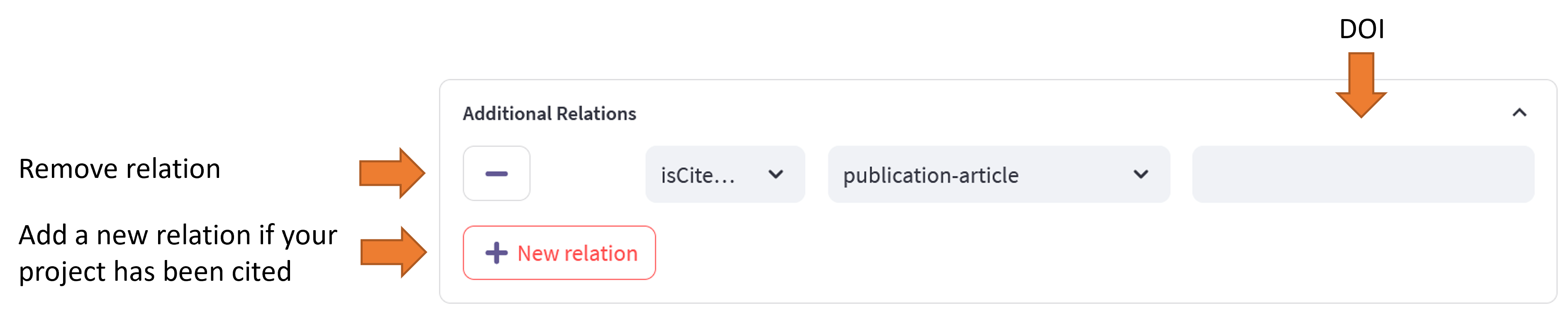
Warning
If you have incomplete relations, the following error will be raised:
- ::
upload errorError updating deposition metadata: 400 Validation error.
metadata.related_identifiers.0.identifier: Not a valid persistent identifier. Identifier is required.
Manual edit of metadata
Replace the empty placeholders, ‘’ and [], with the information about your data. For example:
creators:
- name: YOUR NAME
  affiliation: YOUR UNIVERSITY
- name: NAME OF YOUR COLLEAGUE
  affiliation: UNIVERSITY OF YOUR COLLEAGUE
description: Do not edit this field manually. It will be replaced by the content of DESCRIPTION.md.
keywords:
- keyword1
- keyword2
- keyword3
language: eng
license: cc-by-4.0
title: THE TITLE OF YOUR PROJECT / THESIS / PAPER
upload_type: dataset
Hint
If you already have a DOI for this dataset, you can add it to the study_metadata.yaml file. Otherwise, a DOI will be generated when you upload your project onto Zenodo. For example:
doi: 10.5281/zenodo.1234567
Additional relations
You can add additional relations to the metadata. For example, if you have a paper that is related to the dataset, you can add it to the metadata.
Write project description
You can directly add the project description. The description should be similar to an abstract. This will be used to generate the README.md file when running solidipes report using the information from your description and the metadata.
